Start every inspection by locating a verified authentic example of the exact card: same language, set, and numbering. A solid reference lets you spot subtle layout and color drift instantly.
Understanding Card Identifiers
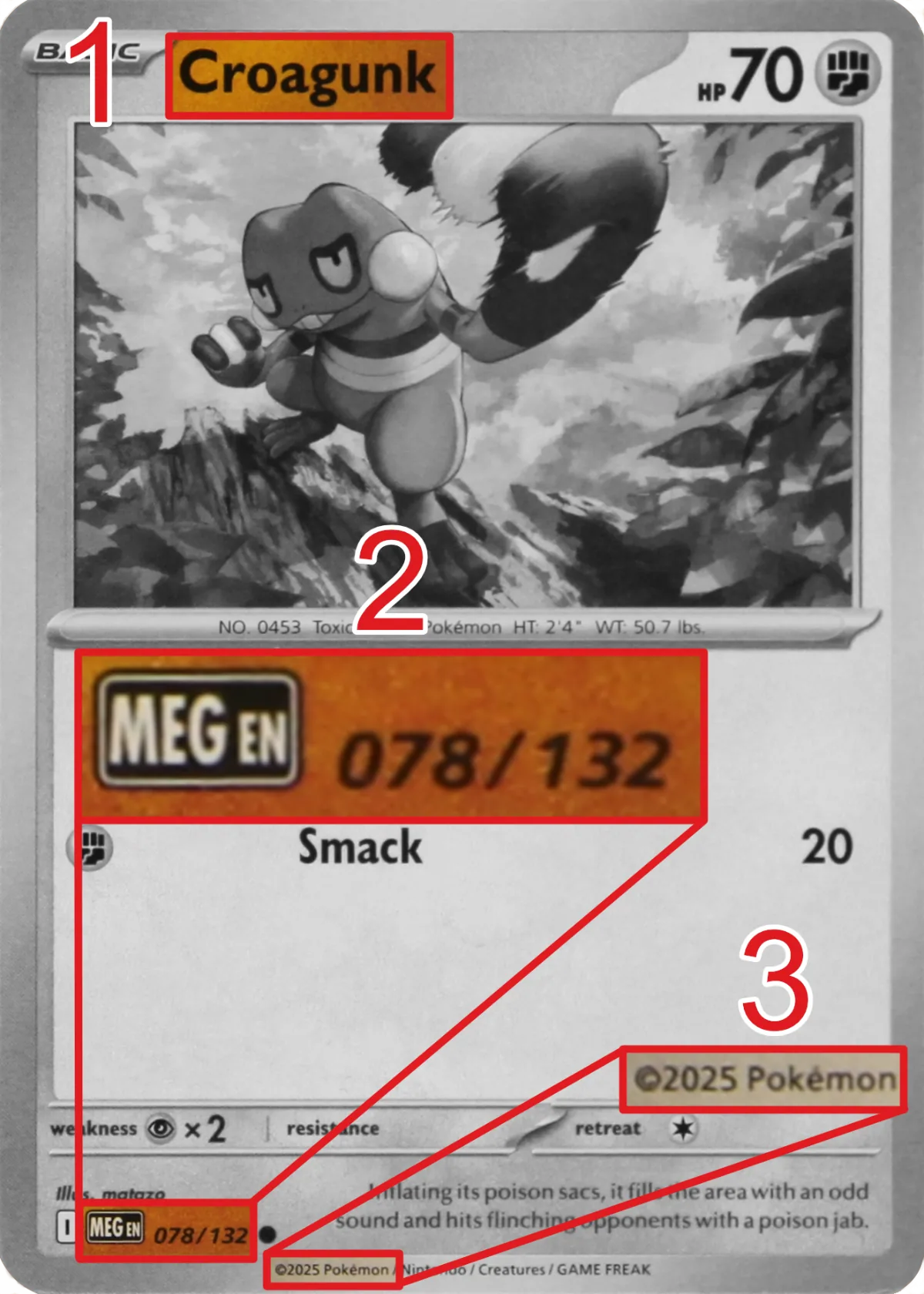
Use the annotated example below as your map. Match these anchors every time you pull a reference:
- 1 - Card name: Top banner. Confirm the spelling matches exactly.
- 2 - Set Abbreviation/Logo and Collector Number: Bottom info line shows the set badge with language (
MEG,EN) and collector number (078/132). The first number is the card's position; the second is the set size (excluding secret rares, which have higher numbers). For set symbols, see PokéSymbols. - 3 - Copyright year: Bottom copyright line (
©2025 Pokémon). The year should match the card's release.
Searching by Name + Set + Number
- Combine the three anchors from the card:
Name + set numberwith optionallyset/era. Example searches: Croagunk 78 orCroagunk 78/132 MEG 2025orCroagunk 78/132 2025. - There could be multiple results, so check the card graphics to find the proper one.
- Cross-check at least two references. If numbering, badge style, or copyright year differ between sources, keep searching until two high-quality images match.
Using PSA/CGC Slab Databases
- PSA and CGC certification lookups often include slab photos of authenticated cards.
- Search by cert number if available, or filter by card name and set. Slab photos give clear shots of front and back layout.
- Treat slab images as high-trust references, but verify the slab label details match the card you hold.
Slab photos are most commonly available for higher-value cards. A certification lookup confirms the record, but you should still check that the label and photographed card match the item being offered.
Using TCGPlayer Scans (and Limitations)
- TCGPlayer listings for higher-value cards frequently include high-resolution scans.
- Prefer listings from verified sellers with strong feedback and “Direct” fulfillment tags.
- Limitations: lighting/color can shift between sellers; treat these scans as secondary to slab or official references.
What Not to Use as Reference
- Random social media photos, auction thumbnails, and heavily compressed images.
- Stock art or 3D renders that lack real print texture (it could work to spot the fakes with the wrong font or layout though)
- Photos where the card angle, lighting, or cropping hide borders and text detail.
Once you secure a trustworthy reference, capture or download it. Keep it side-by-side with your suspect card during the visual comparison tests in the next section.